
Flutterhall Registration, Log In & KYC Verification Guide for Players from the UK
Players from the UK aged 18 or older can complete the Flutterhall registration by sharing basic information and claim a welcome bonus of up to £25,000. Signing up also allows them to activate additional promos, use banking methods and play games with real money. After this procedure, all 15,000+ games from 100+ software providers are available. The following guide addresses registration, verification and Flutterhall login steps.
Creating a Flutterhall Casino Account
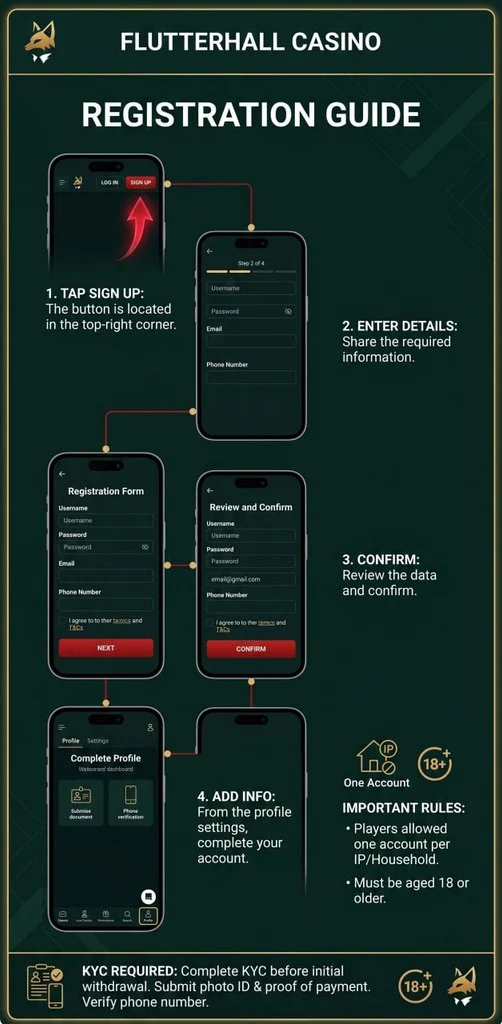
Customers can use these steps on a smartphone, tablet or computer and sign up on the official website within a couple of minutes. To make a new profile, follow:
- Initiate the procedure: Tap the “sign up” button in the upper-right corner.
- Enter details: Share the email and telephone number and create a password.
- Choose country: Flutter Hall registration requires you to choose your country and currency.
- Redeem a promo code: Enter a promotional code for bonus activation.
- Check terms: Read the terms and check the “I am 18 years old” box.
- Confirm: Check the data you have entered and approve registration.
Flutterhall Sign Up Requirements
The first and main requirement is the minimum age for online gambling in the UK, which is 18 years. Signing up or using the Flutterhall Casino login is unavailable to minors. Additional requirements include:
- Active email: You need an email address which is used as one of the login credentials.
- Telephone number: Users need a telephone number with a UK prefix.
- Government-issued documents: These are not required for signing up, but are required for the KYC.
- Location: Customers must be physically located within the UK.
- Personal information: After the initial Flutter Hall login you need to add the full name, address and DOB.
Know Your Customer Verification
KYC is mandatory on the site before the initial withdrawal is possible. Open the account settings and choose “verification” to open a segment of the page where you can upload required photos. The casino requires:
| Verification | Document | Reason |
|---|---|---|
| Identity check | Passport, ID card or a driver’s license. | For identity verification purposes. |
| Liveness check | Selfie | Real-user confirmation. |
| Address | Bank statement or a utility bill. | Connects Flutter Hall Casino login credentials to a physical address. |
| Payment | Screenshot of the Skrill page or bank account. | Proves you have added funds to the casino account. |
In addition to these, members need to complete telephone number verification and may have to upload additional documents if the casino requires that. The processing time is between 24 and 72 hours, but is often completed on the same day.
Flutterhall Login Guide
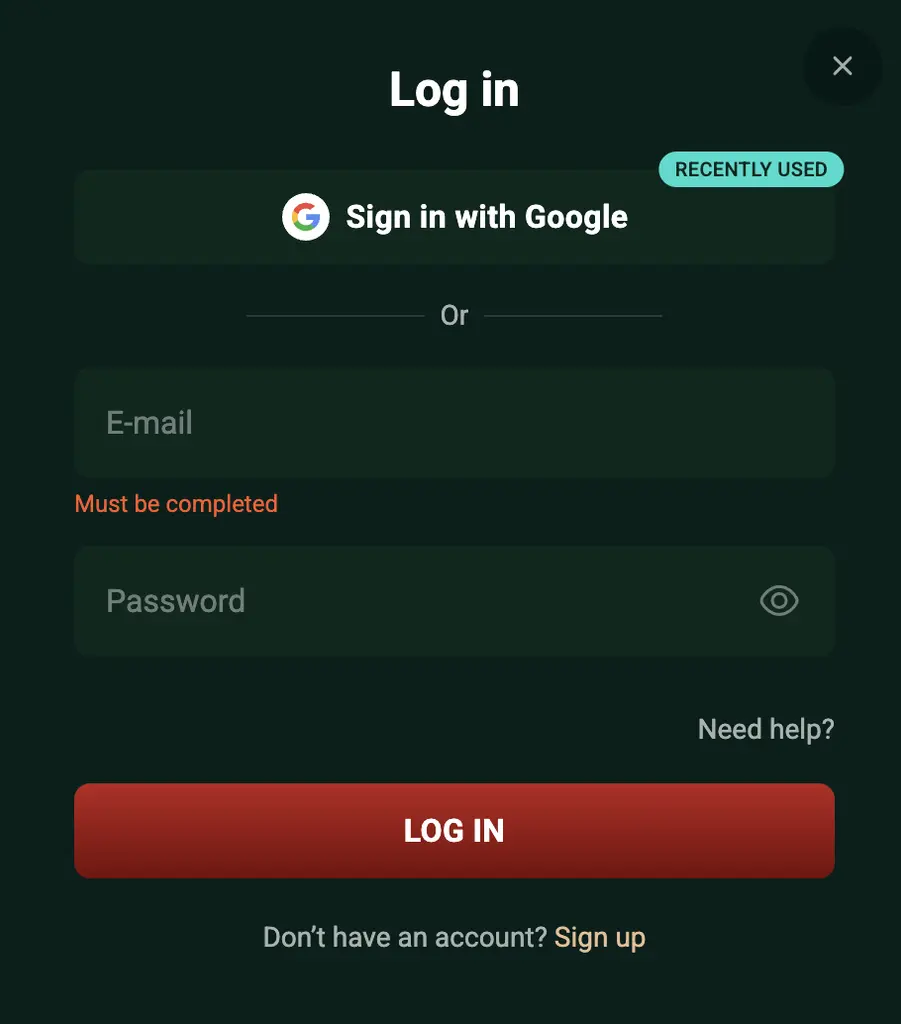
To complete the Flutterhall Casino login procedure, you need an internet connection and your credentials, which must not be shared with third parties. Then, follow these steps.
- Initiate the procedure: Tap the “log in” button in the top-right corner of the webpage.
- Enter email: Share the email used for registration.
- Enter password: Provide a password you created during signing up.
- Confirm: Approve the login-in procedure.
The Flutter Hall registration can be completed only once per IP address or player. Creating multiple profiles with different credentials is not allowed and will result in your account being suspended.
Accessing Account Via Mobile
UK players who want to sign in using a mobile phone can do it in two ways. The first one is to use a mobile version. In that case, the same Flutterhall login steps we covered above apply. If you want to get access via the app, follow these steps.
- Load the site on a smartphone: Use Safari or Chrome.
- Install the app: Add the icon to the home screen.
- Launch it: Open the app for the first time.
- Start the procedure: Tap the “log in” button.
- Enter details: Share your Flutterhall Casino login credentials and approve.
It’s important to add that the same credentials as when using a computer must be used. In this case, you can activate biometric protection (Face ID or a fingerprint scanner on your device) to further secure account access.
Personal Details needed for Flutterhall Registration and Login
UK members need to share their full name, address and email, along with their telephone number and date of birth. To complete Flutter Hall sign up process, you need only an email and a phone number. However, the remaining details should be added to the profile section.
These need to match the documents you share during the KYC procedure. Only then is the verification successful, and withdrawals are completely unlocked.
Possible Login Issues and Solutions
If you have any issues with the Flutterhall Casino login procedure, check for causes and solutions in the following table.
| Issue | Cause | Fix |
|---|---|---|
| Incorrect password | Password entered incorrectly. | Reset the password or try again. |
| Account locked | Suspension. | Contact the customer support. |
| Login unavailable | You are outside the UK. | Use a VPN. |
| The two-factor authentication code is not working | Expired, or you entered an incorrect code. | Request a new code. |
| Site maintenance | Temporary maintenance. | Wait until maintenance is completed. |
If you have any other Flutterhall login issues, contact the support team via live chat for assistance. The support agents will help you access your profile immediately. They are available 24/7, and agents will also help you explain what caused the problem and how to fix it if it appears again.
How to Delete Profile After Flutterhall Registration
Once the Flutter Hall sign up process is completed, members have the right to ask for account removal service. Basically, this means the profile, along with the information, will be removed from the database, and accessing it on your end will be impossible. This may take up to 24 hours. To submit a request, follow these simple steps.
- Sign in: Complete the Flutterhall login using the existing credentials.
- Contact support: Use live chat or email to reach the customer service team.
- Explain the issue: Tell them about your intention.
- Cash out: If you have any funds on the balance, withdraw them.
- Receive notifications: Once the account is removed, you will receive an email notification.
If you are worried about gambling habits, use self-exclusion. It’s available immediately after Flutterhall sign up process and will block access to your page for a selected period of time.